 |
||
Navigation Topics Tutorials Others Contact |
EXCEL
IntroductionExcel, like Lotus 1-2-3 and Quattro pro among others, is a spreadsheet. It's used to make calculations, create models and simulations. When a model is completed, you can try out what will happen to your budget if you buy a BMW instead of a Yugo (not for your image, just your budget). How much manoeuvring room do you have in your budget? What will happen to the company if you increase the promotional budget for a product? What happens if it succeeds? What happens if the promotion doesn't give out the desired effect? These questions, and others, are situations that every administrator, every person has to answer at one time or another. The spreadsheet then becomes a powerful tool to try out different things to be able to make better decisions. Excel has also other tools to help you better to represent, analyze and interpret your data. The next Web pages of this site will help you to create models and to realize the full potential of Excel. |
|




DefinitionsHere is the short description of certain elements that you'll find in spreadsheets such as Excel.
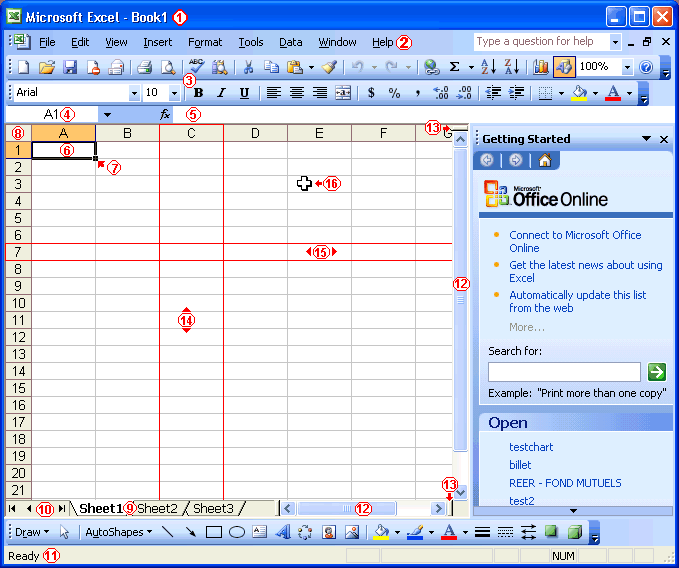
The main menu of ExcelAn interface is the way the user execute the instructions and the functions of an application. The next part demonstrates the possibilities of Excel's interface.
The elements that compose the screen of Excel.
Excel contains also some toolbars with the most popular options. If you have any doubts about a button, press the Shift and F1 keys. Then click on the button that interests you. Before we beginWatch out for viruses! Although they are now rare, there are viruses that can infect an Excel document. Most of these viruses are called macro commands viruses.
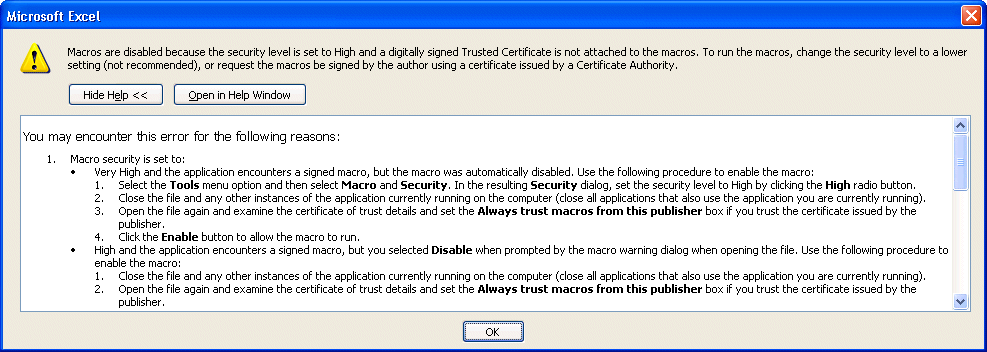
A macro command is a series of instructions that you want to repeat at will. It's a great time saver since it saves you from repeating a boring series of commands. Regrettably, hackers have also found a way to damage your system or to erase files. It's for that reason that Excel asks you when you open a document that has at least one macro command if it should activate them or not. If you know that you created macro for your needs, you can press the " Activate the macros " button. Otherwise, don't risk it and press the "Do not open " button . Use an antivirus program that's up to date to remove the virus of the document. You'll then be able to continue. Even with this warning, you must take its precautions. Always verify your documents with an antivirus program that's updated at least every two to three days and to make several copies of the document. Macro command viruses where so "popular" at one time that Microsoft added a security feature to help prevent the spread of macro command viruses. This option is only available from Excel 2000 and the following versions.
You can then choose from three security levels.
It's up to you to choose the level of security that you want and need. My recommendation is to use the medium level and answer the question at the opening of the file. It's a compromise between protecting yourself against an increasing number of viruses and using a practical option. NOTE:Jovana liked this page so much that she asked me if she could translate it in Serbo-Croatian. I agreed. You can see the results on this link: http://science.webhostinggeeks.com/uvod-be .There are many other pages you can look at and see the original content. It's a great site that does help people to learn. I'm all for it! |
 From
the Tools menu, select the Macro and Security options.
From
the Tools menu, select the Macro and Security options.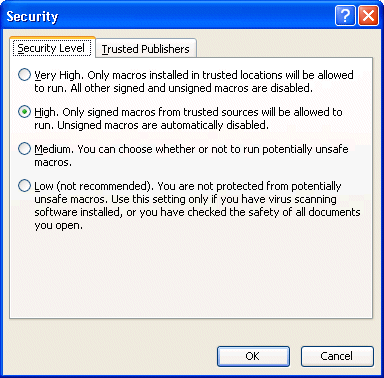
| You like what you read?
Share it with your friends. |
 This site is hosted by 1&1.com
